Trellis Quick Guide
For Staff · Ohio State Chi Alpha
Sign in
- Type the email an admin set up for you and tap Email me a code.
- Type the 6-digit code from trellis@chialphaosu.com. It works for one hour.
On a phone, Add to Home Screen so it opens like an app.
Each week, turn in your report
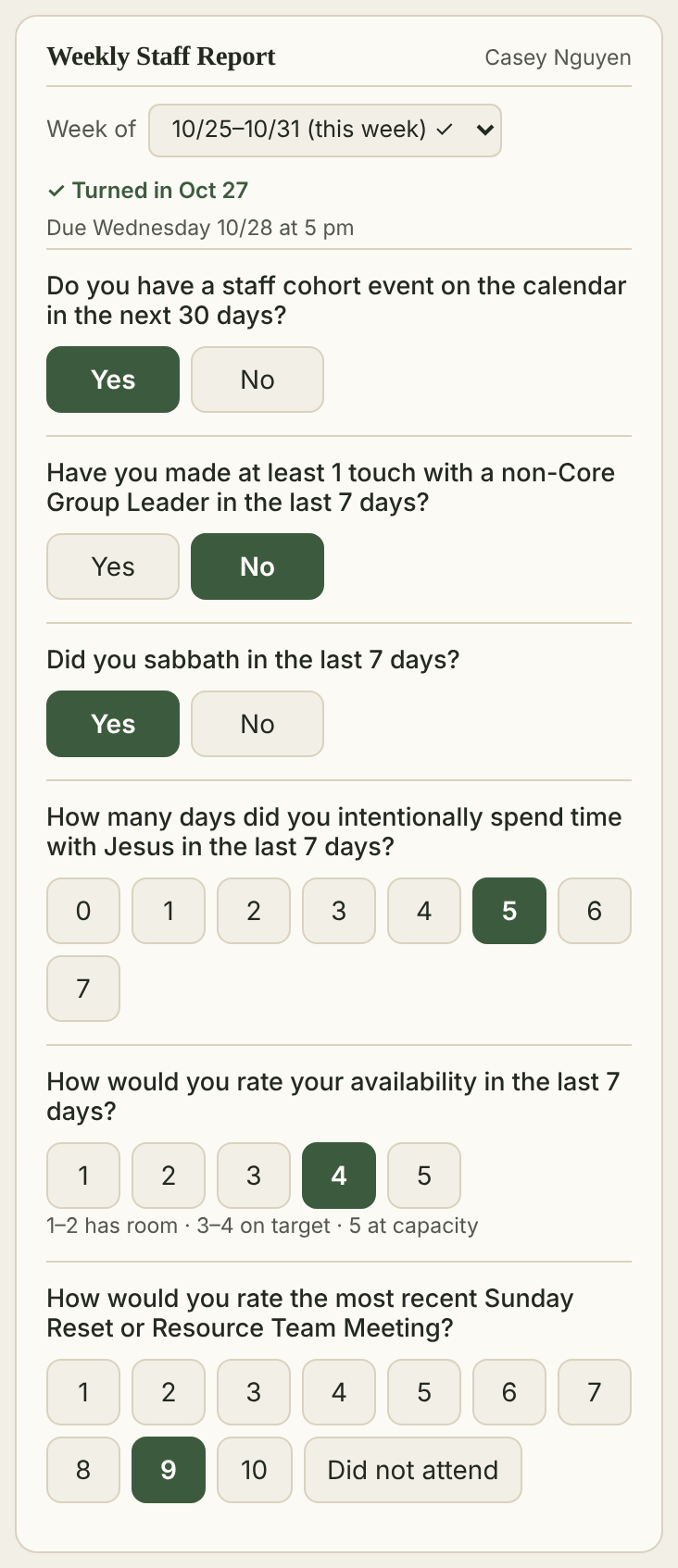
- Answer Yes or No: a cohort event in the next 30 days, a touch with a non-CGL, and a sabbath.
- Tap days with Jesus (0–7) and your availability (1–2 room, 3–4 on target, 5 at capacity).
- Rate the last Sunday Reset or Resource Team Meeting.
Due Wednesday at 5 pm. Answers save as you tap. The top shows ✓ Turned in when you’re done.
My profile
Your report numbers, discipleship, goals, Rocks, To-Do’s, newsletters and assessments. Only you and admins see it.
Goals & Rocks
Pick the quarter, type it in, tap Add. Set its status from the menu as the quarter goes.
Assessments
Tap Edit in that box for StrengthsFinder, Working Genius, APEST and Enneagram, then Save.
Disciple someone on staff?
Tap their card under Discipling on staff, type notes and tap Log meeting.
To-Do’s & Newsletters
Come from Microsoft 365 each night. Change them there.
Lead a team or Core Group too?
Tap Staff at the top to get to Staff Development.
Questions?
Ask a Trellis admin, or tap Report an issue at the bottom of any Trellis page.