Trellis Quick Guide
Sign in
- Type the email an admin set up for you and tap Email me a code.
- Type the 6-digit code from trellis@chialphaosu.com. It works for one hour.
Trellis opens straight to the CGL you disciple.
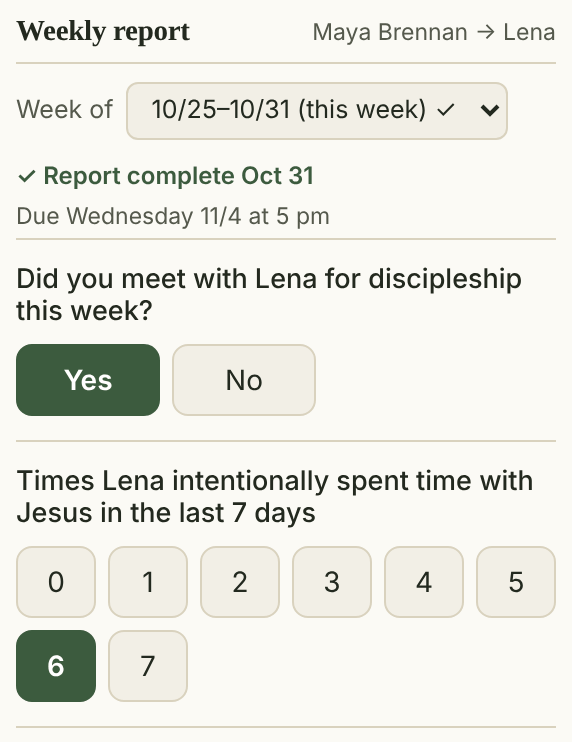
Each week, fill in the report
- Check the Week of box shows the right week.
- Did you meet (Yes/No), and days with Jesus (0–7).
- Tick who they met with, and any Workflow cards they moved.
- Tap their rating of the last Sunday Reset or Resource Team Meeting.
Answers save as you tap. The top says ✓ Report complete when you’re done.
Sync from their log
Tap ↻ Sync from …’s log to tick everyone your CGL logged a meeting with in the last 7 days.
Missed a week?
Pick it from the Week of box. You can fill in any of the last 8 weeks.
Private notes
Your rating note and “anything else” note are seen only by you, admins and your CGL’s Resource Team Leaders.
How they’re doing
Weekly discipleship under the report sums up 8 weeks. Tap a tile for the weeks behind it.
Core Member profiles
Tap Core Member profiles ▾ to open the people your CGL disciples. View only; your CGL keeps them.
Core Competencies
Open Core Competencies at the bottom for all 19 with links to the lessons. Tick one when you cover it together.
Ticked by mistake?
Tap the box again to untick it.
Questions?
Ask your CGL’s Resource Team Leader, or tap Report an issue at the bottom of any Trellis page.